
 AR
ARDecide with the numbers,
not with a hunch.
Ledyvas CFO is the decision dashboard that sits on top of your accounting. It reads data from QuickBooks Online, Zoho Books, Odoo, Xero and Alegra, or from Excel/CSV files and Ledyvas programs, and turns it into an executive dashboard, alerts and a monthly Ledyvas Action Plan. Monthly fee, annual fee or one-time payment.
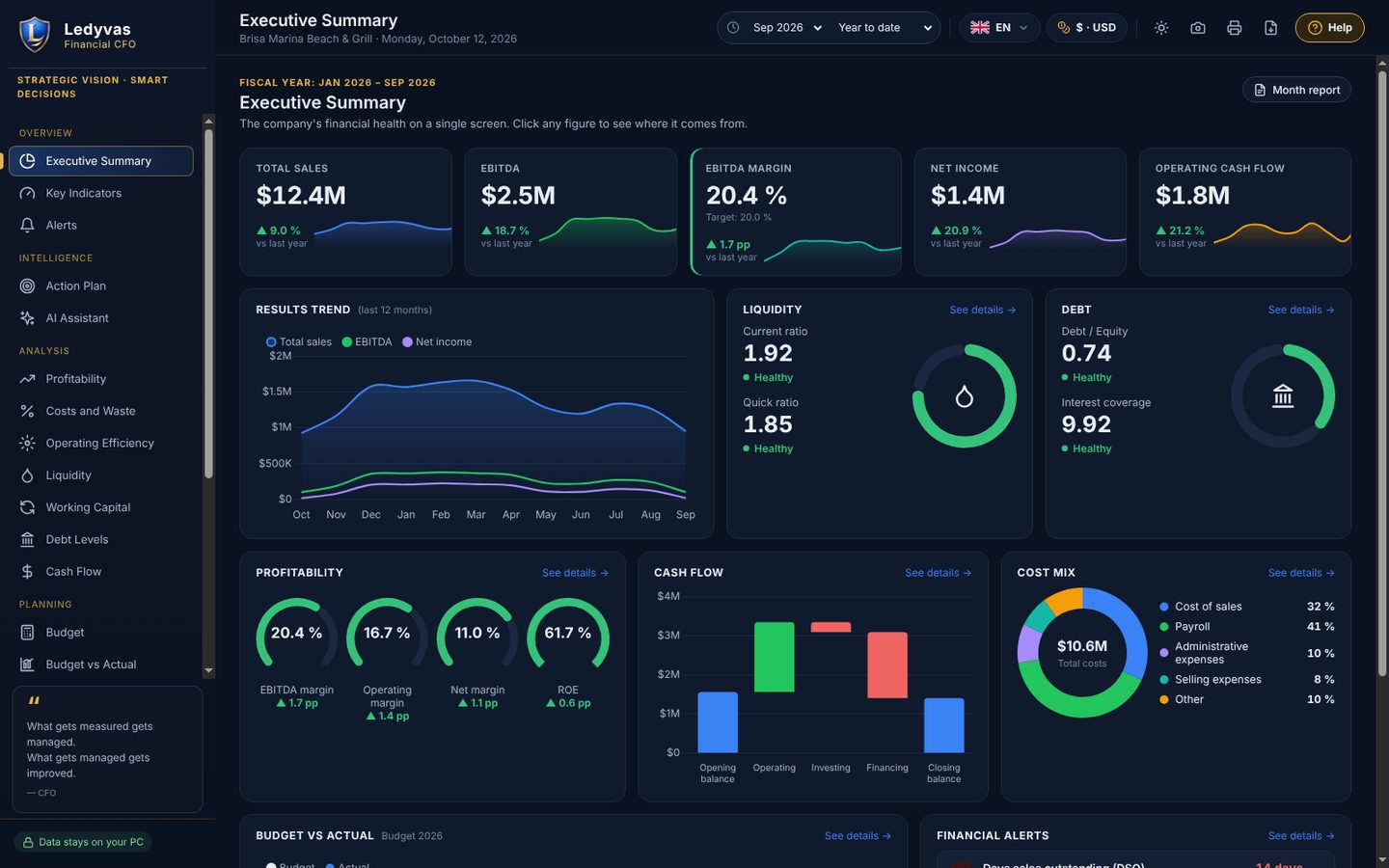
The CFO's dashboard, without building a finance department
Ledyvas CFO is a desktop program for companies that already keep their books in other software. It brings the numbers in, sorts them out and answers the question of every month: what is happening and what should be done. The client installs and uses it, on their own PC.
Executive summary
Sales, EBITDA, margin, net income and cash flow on a single screen. Tap any figure to see where it comes from.
Ledyvas Action Plan
Every month, a prioritised list of actions drawn from the deviations in your figures, delivered in writing. No meetings.
Complete analysis
Profitability, costs and shrinkage, efficiency, liquidity, working capital, debt, cash flow, budget versus actual and scenarios.
Alerts
Warnings when an indicator leaves its range, such as days sales outstanding, margin or liquidity.
AI assistant included
Answers questions about your figures through the Ledyvas server, with no API key of your own. Only with your permission, without sending the company name, and it discards any answer with figures that are not in your data.
6 languages, 156 currencies
Spanish, English, Italian, French, Portuguese and Arabic (right to left). Light and dark theme, printing, PDF, screenshot, and data export and import in Excel.
It connects to what you already use
Your accounting, through the API
Direct connection to QuickBooks Online, Zoho Books, Odoo, Xero and Alegra. The first import accepts up to 3 years of history.
Files
Import Excel or CSV: income statement, balance sheet, receivables and payables, banks. If the balance sheet is missing, you can type it in.
Ledyvas programs
Reads the export from Enterprise and Ultimate and the Métrica reports in Excel (P&L and Executive summary).
Your figures on your phone, without going through Ledyvas
If you turn it on, after each nightly update Ledyvas CFO saves a read-only summary in an encrypted, password-protected PDF, inside a folder that your own cloud syncs. You open it on your phone with your password.
In your own cloud
You choose the OneDrive, Google Drive or Dropbox folder. The data does not go through any Ledyvas server.
Encrypted and password-protected
PDF encrypted with AES-256. Only someone with the password you set, at least 8 characters long, can open it.
Read-only
Indicators, alerts and the 12-month trend. Nothing can be changed from outside. It is generated on your PC after each nightly update, or when you open the program if the PC was off.
The usual way and what Ledyvas CFO does
There are cheaper options. The question is what their missing features cost you.
See the priceWhat it does not do
- It does not keep the books or do tax closings, your accounting software and your accountant do that. CFO reads that data and analyses it.
- It is not financial, tax or legal advice: the figures and the plan support the decision, and the decision belongs to the company.
- It does not make payments or move money: it only reads and analyses.
- It is not cloud-based and does not work with several PCs on the same data. Each installation is standalone and its data stays on your PC.
Ledyvas Budget & Forecast
For planning: the annual budget by account, the year-end forecast month by month and deviations with a traffic light. It is a separate program and is purchased separately.
Choose how to pay
The same price in every country, in US dollars (USD). Try it free for 14 days on your PC before you buy.
How you receive your license
- Buy and pay online. We don't ask you for any other details.
- You receive your activation code instantly, on screen and by email.
- Paste it into the program. The first time, it needs internet to link it to your PC; after that it works without internet.
Examples by industry
Illustrative scenarios showing how different types of businesses can use Ledyvas.
CFO · London (UK) · GBP
Group of three restaurants on Xero
CFO reads Xero in read-only mode and shows the profitability of each restaurant separately, without spreading shared costs. Alerts are sorted from most to least serious, each with its month and indicator.
Features: Xero connection (read-only), profitability by line or location, indicators and alerts.
CFO · Miami (USA) · USD
Boat tour operator on QuickBooks Online
Seasonality makes cash tight in summer. The 13-week cash view shows the gap in advance, and the loan simulator compares instalments before buying a new boat.
Features: QuickBooks Online connection (read-only), 13-week cash, loans, NPV and IRR.
CFO · Toronto (Canada) · CAD
Bakery chain on Odoo
The existing budget is imported from Excel and compared with actual results every month. Forecast and scenarios show what happens if flour or labour costs rise.
Features: Odoo connection (read-only), Budget vs Actual, forecast and scenarios.
Ask the AI assistant
Tap a question and the assistant answers right away, or type your own.
Six programs, each with its own job
Each program installs on your PC and is purchased separately. Use only the ones you need.
Ledyvas Analytics Métrica
The profitability of every day in restaurants, bars, hotels and excursions: recipe cost, waste, COGS % and Prime Cost from your POS sales.
Ledyvas Professional
The desktop ERP for operations: purchasing, inventory, recipes, production, sales and reports, with the Excursion / Tourism module.
Ledyvas Enterprise
Everything in Professional plus a direct API connection to QuickBooks Online, Zoho Books and Odoo, tax per document and accounting file export.
Ledyvas Ultimate
Accounting and taxes that arrive on their own: tax per document, direct API connection to QuickBooks Online, Zoho Books and Odoo, and DGII 606, 607 and 608 formats.
Ledyvas Budget & Forecast
The annual budget by account, the year-end forecast that is recalculated with each actual month, and deviations with a traffic light.
Ledyvas CFO
The finance director's dashboard on your accounting data: indicators, alerts and an Action Plan every month.
You are viewing this program