
 AR
ARBudget and forecast,
month by month.
Ledyvas Budget & Forecast helps you build the annual budget by account and know, every month, how the year is going to close. Months with actual data stay fixed, you project the remaining months, and the program shows you which accounts are drifting from the budget. Monthly fee, annual fee or one-time payment.
Plan the year, follow it every month and correct in time
Ledyvas Budget & Forecast is a desktop program for Windows: it installs on the company PC and the data stays there, encrypted. It answers three questions: how much we plan to earn this year, how it is really going to close, and where we are drifting from the plan.
Annual budget by account
A table by account and by month, just like in Excel, with last year's actual figure under each cell. You can start from last year's actuals plus a percentage, copy another version or import it from Excel. If you type the total for the year, it is spread according to seasonality.
Approved budget
Once you approve it, the budget is locked as the reference and cannot be changed by mistake. Every earlier change is recorded in the history.
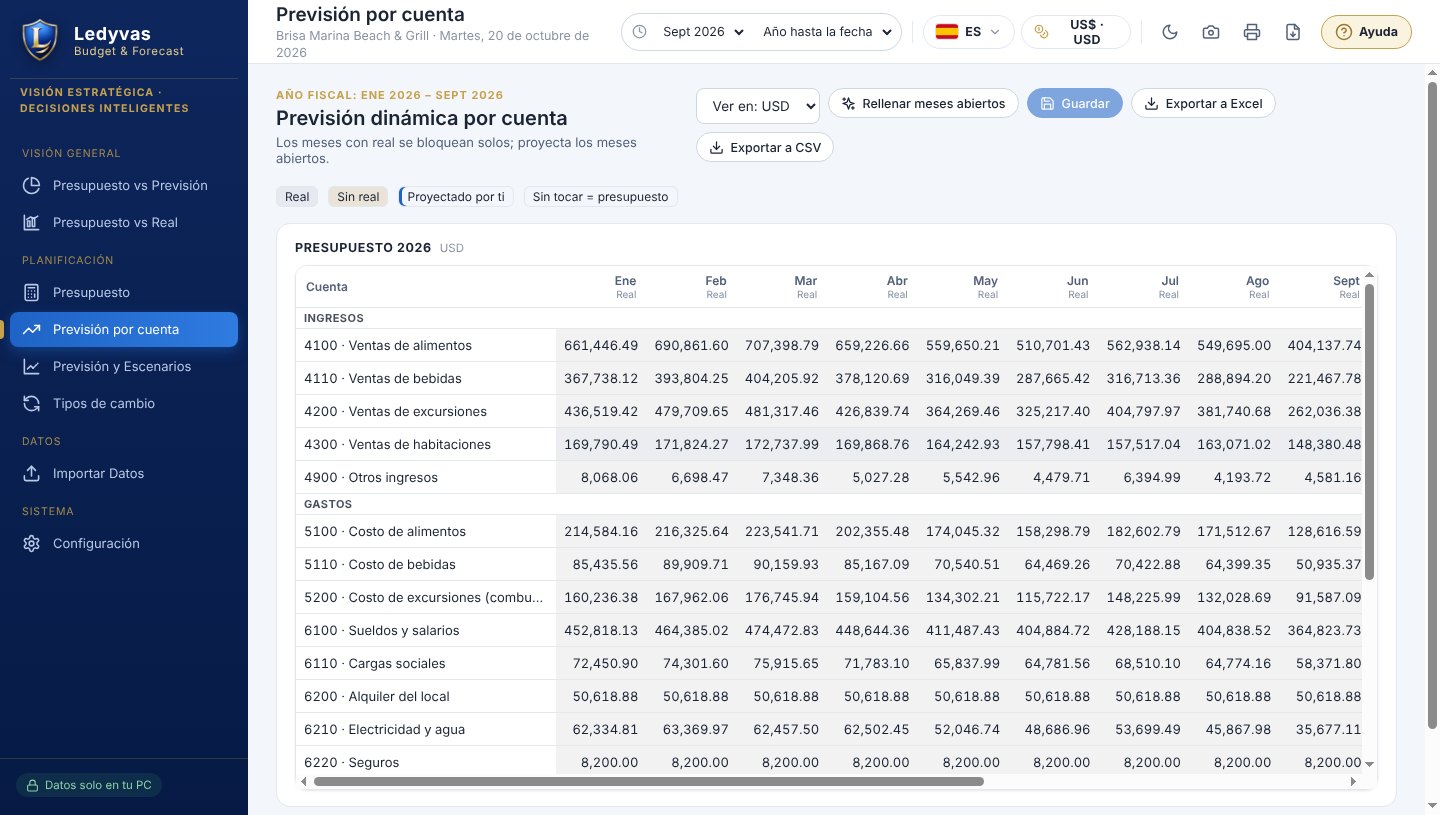
Forecast by account
Months that already have actual data lock on their own. You project the remaining months yourself or fill them in with one click: trend of the last 3 months, budget plus or minus a percentage, or back to the budget.
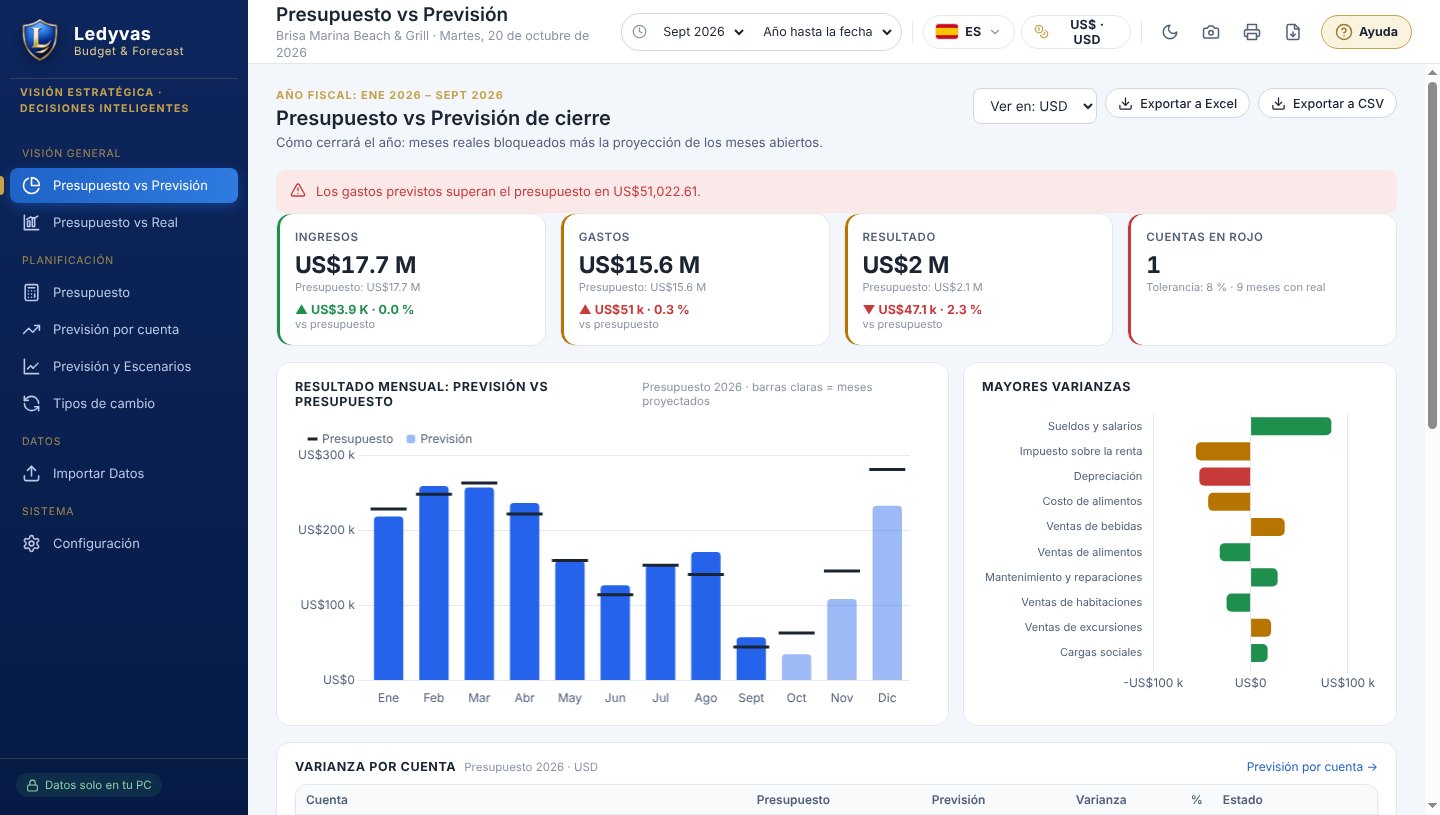
Budget vs Year-end forecast
Revenue, expenses and result for the year: what was budgeted against how it is going to close. A traffic light by account based on the tolerance you set, and a warning when forecast expenses exceed the budget.
Budget vs Actual
The deviation of each account in money and as a percentage, for the month or year to date, with unfavorable ones flagged.
Exchange rates
View the reports in another currency with the rates you load, by hand or from Excel. For future months it uses the latest rate or an estimated rate you set. If a rate is missing, the month shows no data: nothing is ever made up.
Every month, the forecast catches up on its own
When a month's actual data arrives, that month locks and the year-end forecast is recalculated: actual months plus the projection of the remaining months. A finished month without actual data stays open until you load it: the program does not make up figures.
- Import the income statement from your accounting in Excel or CSV.
- Or connect it read-only to QuickBooks Online, Zoho Books, Odoo, Xero or Alegra.
- Export any screen to Excel or CSV.
- Light and dark theme, printing, PDF, screenshot, and data export and import in Excel.
- Built-in AI assistant, no API key of your own: it answers about the budget and the forecast with your figures, only with your permission and without making up numbers (uses internet).
- 6 languages and a demo company to see it in action.
The usual way and what Budget & Forecast does
There are cheaper options. The question is what their missing features cost you.
See the priceWhat it does not do
- It does not keep the books: it does not record journal entries or issue invoices. It reads the data your accounting already has.
- It is not in the cloud and does not run on several networked PCs over the same data: each license is for 1 PC.
- It does not make up data: if a month's actuals or an exchange rate are missing, it shows them as no data.
Ledyvas CFO
For management: indicators, alerts and an Action Plan every month on your accounting data. It is a separate program and is purchased separately.
Choose how to pay
The same price in every country, in US dollars (USD). Try it free for 14 days on your PC before you buy.
How you receive your license
- Buy and pay online. We don't ask you for any other details.
- You receive your activation code instantly, on screen and by email.
- Paste it into the program. The first time, it needs internet to link it to your PC; after that it works without internet.
Examples by industry
Illustrative scenarios showing how different types of businesses can use Ledyvas.
Budget & Forecast · Punta Cana (Dominican Republic) · DOP / USD
Hotel with high and low seasons
The year's budget starts from last year's actuals plus a percentage, and the annual total is spread by seasonality. Each month, the year-end forecast shows in time whether the low season is eating into the result.
Features: annual budget by account, seasonality spread, year-end forecast.
Budget & Forecast · Mexico City (Mexico) · MXN
Distributor with its accounting in QuickBooks Online
The program reads the accounting in read-only mode. Months with actuals lock automatically, the forecast is recalculated and the traffic light by account warns when forecast expenses exceed the budget.
Features: QuickBooks Online connection (read-only), forecast by account, Budget vs Year-end forecast.
Budget & Forecast · Madrid (Spain) · EUR / USD
Group reporting to its partners in dollars
The approved budget stays fixed for the board and every earlier change remains in the history. Reports are shown in dollars with the exchange rates the team loads from Excel; if a rate is missing, the month shows no data.
Features: approved budget, exchange rates, Budget vs Actual.
Ask the AI assistant
Tap a question and the assistant answers right away, or type your own.
Six programs, each with its own job
Each program installs on your PC and is purchased separately. Use only the ones you need.
Ledyvas Analytics Métrica
The profitability of every day in restaurants, bars, hotels and excursions: recipe cost, waste, COGS % and Prime Cost from your POS sales.
Ledyvas Professional
The desktop ERP for operations: purchasing, inventory, recipes, production, sales and reports, with the Excursion / Tourism module.
Ledyvas Enterprise
Everything in Professional plus a direct API connection to QuickBooks Online, Zoho Books and Odoo, tax per document and accounting file export.
Ledyvas Ultimate
Accounting and taxes that arrive on their own: tax per document, direct API connection to QuickBooks Online, Zoho Books and Odoo, and DGII 606, 607 and 608 formats.
Ledyvas Budget & Forecast
The annual budget by account, the year-end forecast that is recalculated with each actual month, and deviations with a traffic light.
You are viewing this program
Ledyvas CFO
The finance director's dashboard on your accounting data: indicators, alerts and an Action Plan every month.